Find us at the Keynote, Day 2, Directions EMEA 2026, Paris, 28 October The keynote is now online
Learning units from existing knowledge

Knowledge becomes learning

Not another video generator. Built to make knowledge last.

Scattered knowledge in. Finished learning units out. In your design, in minutes, and still correct after the next release.

No sharing, no spam. See the privacy notice.

The starting point

Start with what you already have.

Four ways in. All of them things you already have.

Source 01

A topic

One sentence about what it is, who it is for and what should stick. zudub builds the unit from it.

Source 02

A screen recording

Your own software, used once and recorded. The unit shows how it really works.

Source 03

A meeting recording

The hour in which someone explained how it works, kept instead of lost.

Source 04

Your own voice

Just talk, the way you would to a new colleague. zudub does the rest.

Not only software Software rolloutsOnboardingInternal processesProduct trainingWhole coursesAnimated explainers
In minutes

From one source to a finished learning unit.

Minutes, not weeks. No editing software.

Step 1

Source

A topic, a recording, a meeting or your voice.

Step 2

Slides in your design

Your colours, type and logo.

Step 3

Spoken narration

Every slide, in every language you need, with a real voice.

Step 4

Finished unit

Video, audio or PowerPoint. Ready to share or drop into a course.
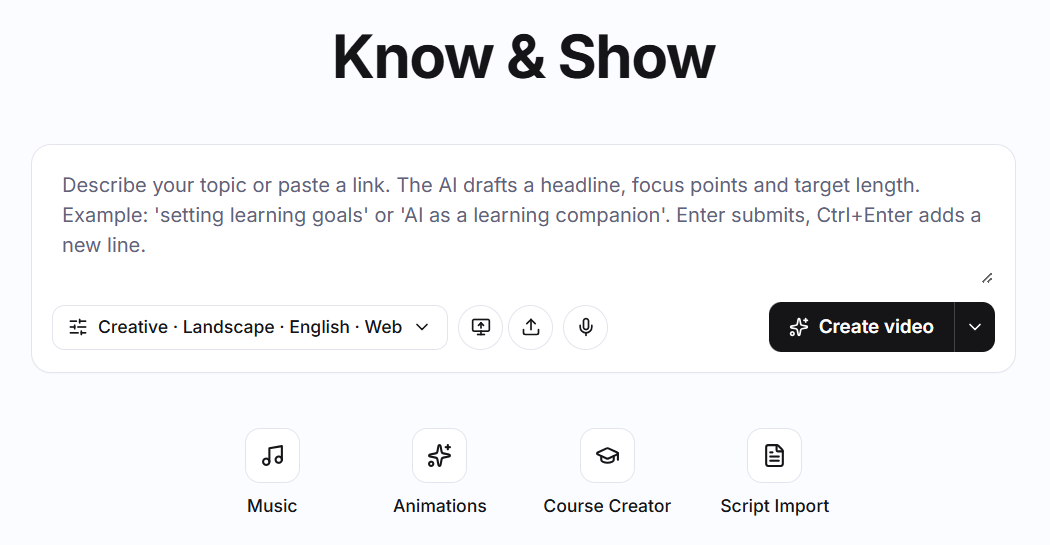
The zudub start screen: describe a topic or paste a link, choose style, format and language, then create the unit.
The start screen. One field, one button.

Watch finished examples

Built to be maintained

Change one sentence. Publish again.

Six months later a release lands and one sentence stops being true. This is where training usually dies.

In zudub you change the sentence and publish again. Slides, narration and every language follow. Nothing gets re-recorded.

Approving an orderPublished

Open the order, check the delivery date and, once everything is in place, click Postclick Release. The customer receives a confirmation within a minute.

Published again, in every language
Languages

One source, every language follows

Instruction sets

Your standards, set once, applied to every unit

Focus

For one person, one team or the whole company

Publishing

Link, Microsoft Teams or SCORM

zudub for Dynamics 365

Built for Dynamics 365.

zudub comes from Learn4D365, where Dynamics 365 is taught every day. Business Central and Sales come first, in your own environment and your own terminology.

Business Central

  • Posting a purchase invoice
  • Month-end close, step by step
  • What changed in release wave 2
  • Your own extensions, explained to users

Sales

  • From lead to opportunity in your pipeline
  • Creating a quote and sending it for approval
  • Onboarding a new sales rep in one week
  • Your own extensions and custom flows

Works the same way with any other software. Dynamics 365 is simply where we started.

See six Business Central units

Who it's for

Where knowledge sits in a few heads.

zudub gets it out of their heads and into the company.

Onboarding

  • New employees
  • First weeks
  • Roles
  • Tools
  • Partners
  • Customers

Meetings

  • Recaps
  • Decisions
  • Requests
  • Handovers
  • Team updates
  • Introductions

Training

  • Courses
  • Exams
  • Refreshers
  • Chapter reviews
  • Web sources

Universities

  • Lectures
  • Terms explained
  • Study programmes
  • Compact intros
  • Course trailers

Marketing

  • Product videos
  • Use cases
  • Video of the week
  • LinkedIn
  • Events
  • Trends

Policies

  • Guidelines
  • Compliance
  • Safety
  • Processes
  • Audits
  • HR

Software

  • Releases
  • Features
  • How-tos
  • Extensions
  • Support
  • Sales demos

Any scattered knowledge, wherever it comes from.

If it lives in a head, a file or a meeting, zudub turns it into a unit.

Watch finished examples

Same source
Landscape for courses
Brand
Your format, your brand

Every format. Always your brand.

Video in landscape or portrait, audio only, or a PowerPoint deck. All from one source, in your brand kit.

Trust and compliance

Your content stays your content.

Isolated

Every customer works in their own environment.

Compliance

Everything legal and compliance ask for, available.

Your AI provider

You decide which AI provider does the work.

Compared

Not an avatar. A unit you can keep.

Avatar tools start from a script you write. A prompt gives you text. zudub starts earlier and ends later.

zudub
Avatar toolsSynthesia, HeyGen
Prompt and pluginsChatGPT, Copilot
Starting point
What already exists: a topic, a recording, a meeting, your voice.
A script you write first.
A prompt, every time.
Output
A whole learning unit as video, audio or PowerPoint, in your design.
A presenter video.
Text. Slides, voice and design are still on you.
Updating
Change the source, publish again. Nothing re-recorded.
Edit the script and render again, per language and per format.
Start over with a new prompt.
Your data
Your own isolated instance. You choose the AI provider.
Shared cloud platform.
Depends on the terms of each tool.
What zudub means

Two Sumerian words. One old idea.

zu, to know. dub, the clay tablet. Five thousand years ago, scribes pressed what they knew into clay so it could leave the room. The material has changed. The movement has not: out of one head, into many.

zudub, explained